RAG Pipeline from Scratch
A Retrieval-Augmented Generation pipeline built from scratch with Ollama — no LangChain, no cloud APIs — evolved from a single notebook into a local Streamlit app with multi-document comparison and automatic query routing.
PythonChromaDBNLTKOllama (nomic-embed-text, llama3.2)Streamlit
The problem
Most RAG tutorials start and end with langchain.from_documents() — a few lines that hide every interesting decision inside a framework call. I wanted to understand what's actually happening: how text gets chunked, how embeddings turn meaning into numbers, how similarity search actually finds relevant context, and how that context turns into a grounded answer. So I built the whole pipeline by hand, running entirely locally against Ollama with no cloud APIs and no LangChain.
Starting point: RAG in its simplest form
The first version was intentionally minimal: load one PDF, split it into overlapping character-based chunks, embed each chunk with Ollama's nomic-embed-text model, and store the embeddings in a plain Python list. For a question, I embedded it the same way and computed cosine similarity by hand against every stored chunk, took the top matches, and passed them to llama3.2 as context for the final answer. No vector database, no index — just loops and NumPy. It worked, and more importantly, it made every step visible.
Scaling to multiple documents
A single PDF doesn't test much. I extended the pipeline to load an entire folder of PDFs and tag every chunk with a source field so retrieval could later be scoped to a specific document. This is also where the manual cosine-similarity loop started to show its limits — it's fine for ten chunks, unworkable for hundreds. I replaced it with ChromaDB, a persistent local vector store: it indexes embeddings for fast nearest-neighbor search and survives between runs, so I stopped re-embedding the same documents every time I restarted the notebook.
Comparison-aware generation
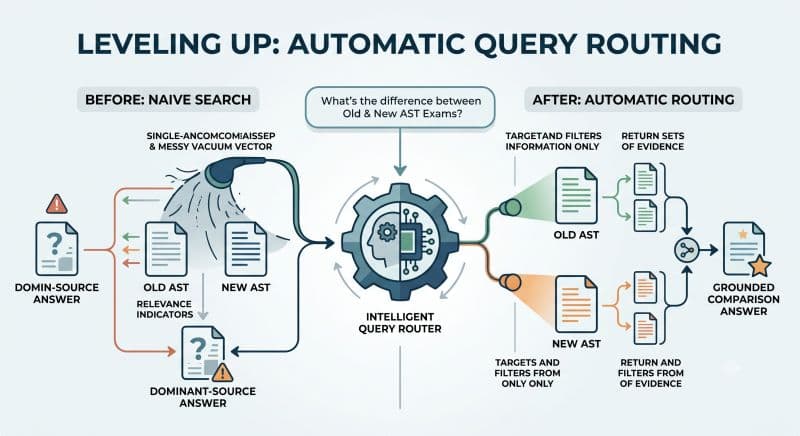
Once the pipeline handled multiple documents, a natural use case appeared: comparing two versions of the same document (I tested this against two versions of a course's exam guidelines — "what changed between the old and new AST exam rules?"). A single similarity search across a mixed collection doesn't answer that well, since it just returns whichever chunks are closest regardless of which document they're from. I added a filtered retrieval path using Chroma's where clause to pull top matches from each document separately, then built a comparison-specific prompt that explicitly labels an OLD and a NEW context block and asks the model to identify what changed between them.
Automatic query routing
Manually deciding "is this a lookup or a comparison question?" and passing the right filename defeats the point of a natural-language interface. So I added a routing layer: the question is first sent to llama3.2 with a classification prompt that returns structured JSON — either {"type": "lookup"} or {"type": "comparison", "item_a": ..., "item_b": ...}. For comparisons, the extracted phrases (e.g. "old AST exam") aren't real filenames, so I match them to actual filenames by embedding both the phrase and every candidate filename and picking the closest one by cosine similarity — a second, smaller RAG problem nested inside the first.
Failure modes in the routing layer
That filename-matching step is where the two hardest bugs in this project turned up — one that crashed loudly, and one that doesn't crash at all, which is the more dangerous kind.
The one that crashed: an empty collection disguised as a broken filter. Mid-project, running the automatic-routing test threw a ValueError from inside Chroma: "Expected where value to be a str, int, float, or operator expression, got None." The traceback pointed at find_relevant_chunks_filtered, several stack frames away from the actual cause. I found the real problem by reading back through the notebook's own saved cell outputs rather than the traceback itself: answer_question_auto was being called in the last cell but wasn't defined anywhere in the notebook, and the outputs of the cells just above it already showed what had gone wrong — available_filenames: [], file_a: None, file_b: None. A "clear and rebuild the collection" cell had been run at some point, but the embedding cell that reloads it hadn't been re-run afterward, so match_item_to_filename was searching an empty list and had nothing to return but None. The fix had two parts: add the missing answer_question_auto function, and inside it, an explicit guard — if either matched filename comes back None, return a clear message instead of letting None reach Chroma's where filter at all. Then reload the collection.
The one that doesn't crash: a confident-looking wrong answer. match_item_to_filename() has no minimum-confidence check — it always returns whichever filename scored highest against the extracted phrase, even if that score is low. That's fine when filenames are descriptive (ast_exam_old.pdf vs. ast_exam_new.pdf), but with generic filenames the "best" match becomes close to arbitrary, and the function hands it back with the same confidence either way. This one wasn't found by a crash — it came out of asking the question directly: what happens when the filenames aren't descriptive? Unlike the None case above, a bad-but-non-None match doesn't trip any guard; it just quietly compares the wrong two documents. This is flagged but not yet fixed. The natural next step is logging the best score and treating anything under a threshold as "no confident match" — returning None so the existing guard catches it — but that threshold hasn't been implemented.
Sentence-aware chunking
The original chunker split text at fixed character offsets, which regularly cut sentences in half mid-thought. I replaced it with a sentence-aware chunker built on NLTK's tokenizer: it groups whole sentences up to a target length, with a small sentence-level overlap between consecutive chunks, so retrieval never hands the model a fragment that starts or ends mid-sentence.
From notebook to a real tool
The full system — loading, chunking, embedding, storage, retrieval, comparison, and routing — still only lived inside notebook cells, which meant testing a new question meant editing a variable and re-running cells by hand. Not something you could hand to someone else. I extracted all of that logic into a standalone Streamlit app (app.py): a text box, a submit button, and a loading spinner while the local LLM thinks, all running against the already-persisted Chroma collection built earlier — no re-embedding needed to use it. streamlit run app.py now opens a real browser-based tool where any question, lookup or comparison, gets routed and answered automatically.
Outcome
What started as "let's see how RAG actually works under the hood" became a locally-run, multi-document Q&A tool with automatic query classification, document comparison, and a real UI — built without a single line of LangChain, and without sending a single request to an external API. The bigger takeaway was less about the specific pipeline and more about the debugging instinct it built: most of the hardest bugs weren't in the "smart" parts (the LLM prompts) — they were in the plumbing between them (an unrefreshed vector store, an unguarded None), which is exactly the kind of thing a framework would have hidden from me.