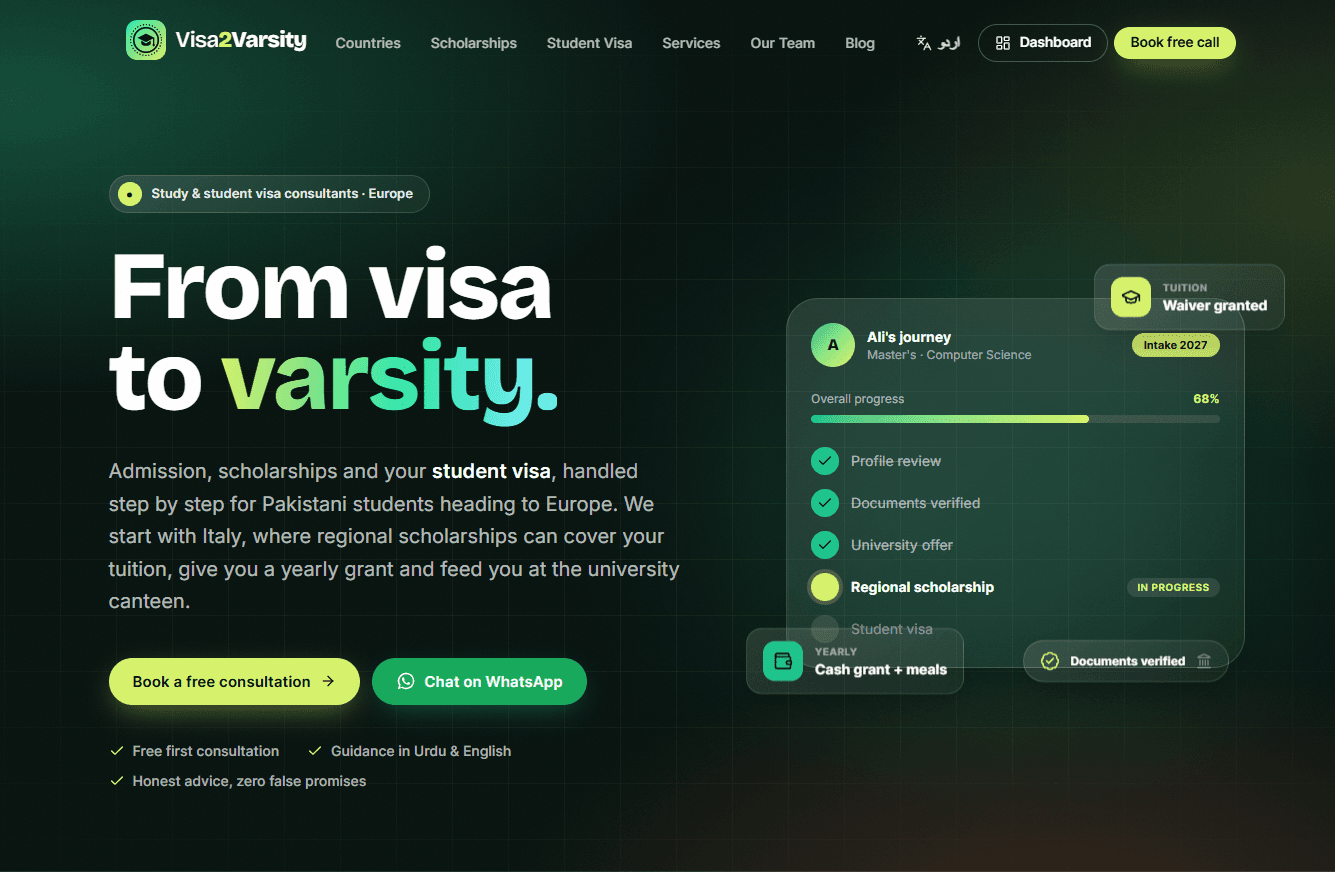
Visa2Varsity: building a study-abroad consultancy platform from scratch
A website, a CRM and a student portal in one codebase, for students from Pakistan who want to study in Europe.
Next.js case studyNext.js CRMstudent portalbilingual website Next.jsUrdu RTL websitestudy abroad consultancy website
The problem
Every year, thousands of students in Pakistan try to get into a European university. Italy is a popular first choice because of its scholarships and low tuition. The process is confusing. The rules live on embassy PDFs, university portals and regional scholarship bodies, and they change. Students get most of their information from WhatsApp groups and agents who are hard to compare.
The client is a consultancy with two teams. The team abroad does the actual consulting. The team in Pakistan handles marketing and support. They needed one place that does four jobs:
Explain the process clearly to a nervous student and their family.
Let the student book a call without a dozen back-and-forth messages.
Give the team a back office to track every enquiry from first contact to visa.
Give each student a private place for their documents, their checklist and their questions.
I built that as one product, not four tools stitched together.
What I built
A public site that answers questions
The marketing site is bold and modern, because a consultancy site that looks like a template does not earn trust. It covers countries, regions, scholarships, services, a team page, a blog and an FAQ. All of it is managed from the admin panel, so the team adds a new country or scholarship without a developer.
It is fully bilingual. English is the default, and /ur serves Urdu with proper right-to-left layout. The language is part of the route (/[locale]), and a small proxy rewrites English addresses such as /about to /en/about behind the scenes, so English URLs stay clean. Because the language is in the route and not in a request header, every public page can be built once and served from the cache. When the team publishes something, the pages are refreshed on demand. Content that lives in the database stores its Urdu text next to the English. The built-in content syncs on each deploy and only fills fields that are empty, so the team's edits are never overwritten.
A booking system that respects time zones
Students pick a consultant and a time slot. Slots are generated from each team member's weekly availability, set in that person's own time zone. The editor shows the Pakistan-time equivalent next to every window, so nobody has to do the maths. Time off and a minimum notice period are respected. Two people cannot book the same slot, even if they click at the same moment, because the booking is checked inside a database transaction with a lock per consultant. Confirmation messages go out straight away, and reminders go out 24 hours and 1 hour before the call.
A student portal
Once a student signs up and confirms their email, they get a private portal. It has a document vault with a request list from their consultant, a 16-step checklist that the consultant ticks off, an applications tracker with deadlines, a message thread with the team, and a profile. A consultant can reject a document with a note, or ask for a new one. Students see only their own file, and the server checks that on every request, not just in the menu.
A CRM for the team
Every enquiry becomes a lead with an owner, a status and a history. From there it converts into a student with a journey map that shows which stage they are at, from enquiry to arrival. Conversion runs as one database transaction, so a double click can never create two students.
Lead rules assign new leads automatically, for example by city or study level, and rotate fairly between people. There are four roles: admin, staff, consultant and student. Consultants see only their own students, leads and exports, and the server enforces it. An activity log records the important changes, and CSV exports are protected against spreadsheet formula injection.
A reports page shows where leads come from, how fast the team replies, the funnel from lead to booking to student, and how long students spend in each stage.
Automation, with a human in the loop
Messages go out through email, and for WhatsApp there are two modes. The Cloud API is supported, and a manual queue is the default. In the manual queue, the system prepares the message, and a team member taps one button to open WhatsApp with the text already filled in, then presses Send. I chose this on purpose. Messages sent from a person's own number feel personal, and there is no spam risk to the business number.
A scheduled job runs every ten minutes. It sends queued messages, lets the team retry any that failed, alerts the team when a new lead has waited too long, reminds students 7, 3 and 1 days before a deadline, and clears old data under retention rules. Email replies from students flow back into the system through a webhook, and the system only trusts a reply when the sender's domain passes DMARC, so nobody can forge a message from a student.
Large file uploads
Students send passports, transcripts and certificates, and these files are big. Direct uploads through a serverless function hit size limits quickly. So the browser shrinks photos before sending, and anything still too large goes straight to private Vercel Blob storage. The server also checks the first bytes of every file, so a renamed program cannot be filed as a PDF. Documents are never public. They are streamed through an authenticated route that checks who is asking.
Security, because the data is sensitive
This app holds passport numbers, so I treated security as a feature:
Passport numbers are encrypted at rest with AES-256-GCM and decrypted only when shown.
Sessions are signed tokens that the server can revoke. Changing a password signs out every other device. A team member created with a temporary password must choose their own before doing anything else.
Login, sign-up and other sensitive actions are rate limited per address and per email, and public forms use reCAPTCHA v3.
Sign-up and password reset give the same answer whether or not an email is registered, so the forms cannot be used to find out who has an account.
The newsletter uses double opt-in with one-click unsubscribe.
Security headers (CSP, HSTS and the rest) are on every response. If the email key is missing in production, the app refuses to sign people up instead of quietly weakening itself.
Terms, Privacy and consent
The Terms and Privacy pages exist in both languages, and the forms record consent. The business model is honest by design: nothing is guaranteed, and the site says so. Analytics are privacy-friendly, and pages with secret links in the address are excluded from tracking.
Source Watch: an AI tool that checks its own quotes
Visa and scholarship rules change, and an outdated blog post can hurt a student. So I built a tool that reads official public pages and keeps the site honest.
I started by building a change monitor. It fetches an official page, diffs it against the last version and flags changes for a human to review. My client's real need turned out to be different. They wanted to read an official page or PDF once, get a clean set of working notes, and then either write a blog post from those notes or have a draft written for them. So I rebuilt it around that flow:
Fetch an official page or PDF. The fetcher identifies itself, respects
robots.txt, has a timeout and a size cap, only uses the standard web ports, and refuses to hit private network addresses.Extract the text, from HTML or PDF.
Write notes. An AI model pulls out the process, documents, dates and money figures into an editable note. Each fact carries a quote from the page, and the system checks that the quote really appears in the source. Anything it cannot verify is flagged for a human. When I tested it with a deliberately invented claim, the check caught it and marked it.
Draft a blog post in English and Urdu from those notes, saved as a draft with a link to the source. A person edits and publishes it.
Track changes over time as a bonus. The system reads only the changed lines, drafts an update in English and Urdu, and puts it in a review queue. Approved changes show up on country pages as "Latest official updates" with a "verified against official sources" date.
It ships with 19 starter sources: the Italian embassy and visa centre in Islamabad, the ministry of universities, Universitaly, and the regional scholarship bodies.
The rule I kept: the AI proposes and a human decides. Nothing goes live on its own, and the tool only touches publicly available official information, never personal data.
The time zone bug that hid my blog post
While testing, a blog post I published did not appear on the site. I suspected caching first, and proved the caching was fine. The real cause was time zones. A date typed into a form box is a clock reading, not a moment in time, and my code treated it as the server's clock. The post was scheduled for a moment that had not arrived yet.
Time zones were hurting other places too: consultant availability, time off, bookings, deadline reminders. So instead of patching each one, I wrote a single time module that every date and time in the app goes through, and I added lint rules that forbid the old shortcuts everywhere else. It separates three different things: a moment in time, a clock reading in a named zone, and a calendar date with no time. I then ran the same checks under four different server time zones, including Pakistan, New Zealand and California, and across the Italian clock change in October, and the output was identical.
How I tested it before launch
Before going live I ran a full pass on a production build, not the dev server. A crawler visited 78 pages and 102 links in both languages and checked titles, headings, images, headers and lang attributes. I measured key pages at phone width for horizontal overflow, and checked sign-in and sign-up forms for labels. Then I drove the real app in a browser as each role: a student, a consultant, a staff member and an admin. I used a stand-in email server and a stand-in AI so I could see every message and exercise every failure.
That pass found real problems that no amount of code reading had: a language switcher that built /ur/en/... links, a missing share image on every page, opening hours that could be saved backwards and make booking impossible, and a CSV export that put a stray apostrophe in front of every phone number. I fixed each one and re-ran the checks.
Decisions worth explaining
One codebase. Site, CRM and portal share one data model. A lead, a booking and a student are the same person at different moments, so the data should say so.
Server actions over a separate API. Fewer moving parts and less code to keep in sync.
Manual-first automation. Start with what the team can trust, and add full automation when they ask for it.
Mobile first, including the admin. Staff often work from their phones. I tested the admin at phone, tablet and laptop widths and fixed several layout problems, including a CSS grid issue where one long label stretched a whole page past the screen edge.
Scope discipline. Online payments, referrals and webinars were deliberately left out. The client collects payments directly, so building a payment system would have been wasted effort.
What I learned
Listen for the workflow, not the feature. I built the wrong Source Watch first because I answered "monitor these sites" literally. The better question was what the person does with the information afterwards.
AI output needs a verification step. Quote checking made the difference between a demo and something a team can rely on.
Real data is messy. Some official sites block bots, some render everything in JavaScript, and some time out. A good fetcher spends as much effort on failing clearly as on succeeding.
Time is a product feature. If your users and your team live in different zones, one shared time module is cheaper than a hundred small fixes.
Bilingual from day one is cheaper. Adding Urdu and right-to-left later would have meant touching everything.
Test the real thing. The most useful bugs came from using the finished app the way a student and a consultant would, not from reading the code again.
What's next
Payments, partner courses, webinars and a referral programme are on the list for when the business needs them. Source Watch will grow with more official sources as the team adds countries beyond Italy.
Want to see it? Visit visa2varsity.eu, or get in touch at kumarkaran.com.